
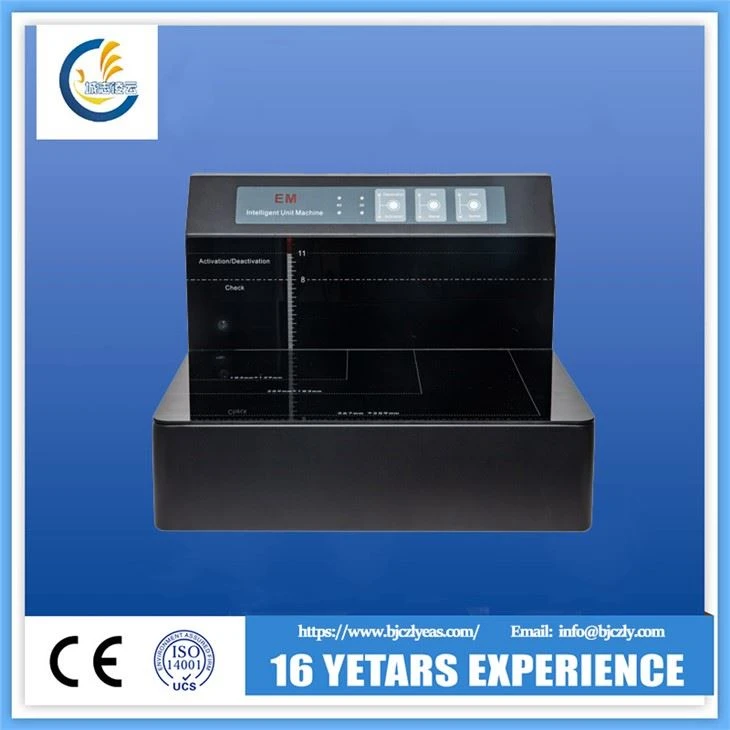
Lub tsev qiv ntawv EM Tag nrho-hauv-ib qho chaw ua haujlwm
Tus qauv CZ-CXJ-8000 integrates lub zog ntawm kev ua kom, deactivation thiab magnetic detection. Txhua tus qauv muaj qhov yooj yim -rau-siv interface thiab intuitive taw qhia.
Send Inquiry
Product Details ofLub tsev qiv ntawv EM Tag nrho-hauv-ib qho chaw ua haujlwm
Library EM All-in-one workstation
Yam ntxwv
● Kev ua haujlwm yooj yim --Qhov kev xaiv tsis siv neeg thiab phau ntawv hom tuaj yeem ua tau raws li txhua yam kev ua haujlwm.
● Kev ua tau zoo heev--Qhov siab ua haujlwm tau zoo thiab ua kom tsis muaj zog yog siab li 9 cm. Ib txoj haujlwm tuaj yeem qhib / deactivate ntau phau ntawv tib lub sijhawm.
● Zoo meej muaj nuj nqi--Nws tuaj yeem qhib, kaw thiab ntes cov kab hlau nplaum. Cov cuab yeej tuaj yeem kuaj xyuas seb puas muaj cov kab hlau nplaum sib nqus hauv phau ntawv, seb cov kab hlau nplaum puas tuaj yeem ua tsis tau lossis seb cov hlau nplaum ruaj khov thiab cov kab hlau nplaum puas muaj hlau nplaum.
● Reliable operation—In terms of the effective operation space or execution speed, the device can ensure reliable activation, deactivation and magnetic detection.
● Kev sib raug zoo zoo--Lub cuab yeej tuaj yeem ua haujlwm ntawm txhua hom hlau nplaum tam sim no, suav nrog cov tuam txhab sib txawv (xws li 3M, Checkpoint Meto, Tagit, thiab lwm yam), cov khoom siv sib txawv amorphous (xws li kev sib haum xeeb yoj thiab Barkhausen effect) thiab cov neeg los ntawm ntau lub teb chaws (xws li Tuam Tshoj, Lub Tebchaws Yelemees, Czech koom pheej, Ixayees, Russia, thiab lwm yam).
● Kev siv hluav taws xob tsawg--Lub cuab yeej tsuas yog ua haujlwm thaum cov ntawv dhau los lossis thaum tau txais cov lus los ntawm lub tshuab luam ntawv barcode lossis lub computer. Hauv hom standby, lub zog ntawm lub cuab yeej tsuas yog 100mV. Nws tsis tsuas yog txuag lub zog, tab sis kuj txo cov pa phem electromagnetic.
Technical specifications
Fais fab mov | 220 ntxiv rau 10% VAC 50/60 Hz |
Hwj chim | Standby: 100 mW |
Hom kev ua haujlwm | Standby, ua haujlwm |
Kev ceev ntawm kev ua kom thiab deactivation | Tsawg dua los yog sib npaug li 500 ms |
Siv tau qhov siab ntawm kev ua kom / deactivation | Standard cobalt raws magnetic stripe: Tsawg dua los yog sib npaug li 9 cm |
Barkhausen effect magnetic stripe: Tsawg dua lossis sib npaug li 5 cm | |
Qhov siab tshaj plaws nrhiav kom pom (ze infrared sensor) | Sib nqus stripe nrog 12-30cm: 5-9cm |
Sib nqus stripe nrog 6-9cm: 3-5cm | |
Magnetic stripe nrog Less tshaj los yog sib npaug rau 6 cm: Tsawg tshaj los yog sib npaug rau 3 cm | |
Loj | 4 19370310mm |
Qhov hnyav | 19 KG |
Control unit thiab interfaces
1) Fais fab interface: siv los txuas 220 V lossis 110 V AC fais fab mov.
2) Lub ntsiab hloov khawm: siv los qhib thiab tawm lub cuab yeej.
3) RS-232 serial chaw nres nkoj: reserved interface.
4) Pab hloov pauv: qhib thiab tawm lub cuab yeej thaum kos rau hauv kev teeb tsa
Hloov Fuse
Lub fuse yog muab tso rau hauv lub qhov hluav taws xob lub qhov hluav taws xob ntawm tus tswv tswj hwm thiab suav nrog lub fuse seem.
1. Tua lub hwj chim ntawm tus tswv tsev tswj.
2. Ntxig ib lub tiaj tus ntsia hlau rau hauv lub qhov ntawm lub fuse tuav thiab rub tawm tus tuav tawm sab nraud.
3. Replace the current fuse with a spare fuse or a fuse with the same specification (250 VAC @ 4 A,Φ5 x 20 mm), and then plug the card holder back into the power socket.
Kev teeb tsa
Muab lub console ncaj qha rau ntawm qhov chaw thiab muaj peev xwm dais nws qhov hnyav, lossis kos rau hauv lub dav hlau.
Kev ua haujlwm yooj yim
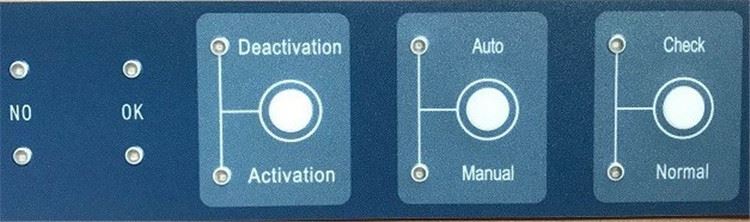
Sib nqus check
1. Xaiv hom tshuaj xyuas.
2. Raws li seem ntawm "kev ua haujlwm tshwj xeeb (nplooj 10)", muab cov phau ntawv los kuaj xyuas ntawm lub console kom raug.
Ib tug ntawm plaub lub teeb yog nyob rau.
Lus Ceeb Toom thiab Lus Qhia
Rau qhov raug, nws raug nquahu kom muab ib phau ntawv nkaus xwb rau ib lub sijhawm.
Ua kom tsis muaj zog thiab tsis ua haujlwm
1. Xaiv hom li qub.
2. Xaiv hom pib; los yog, xaiv Manual hom, thiab tom qab ntawd xaiv Qhib lossis Deactivation.
3. Muab cov phau ntawv kom raug qhib / deactivated ntawm lub console raws li tau piav qhia hauv ntu< operation="" specification="" (page="" 10)="">Ib tug ntawm plaub lub teeb yog nyob rau.
Lus Ceeb Toom thiab Lus Qhia
Yog tias koj xav ua kom tau txais kev ua kom / deactivation ntawm ntau phau ntawv tib lub sijhawm, tag nrho cov hlau nplaum hauv lawv yuav tsum deactivatable; txwv tsis pub, qee qhov sib nqus strips yuav tsis qhib lossis kaw kom raug.
Hot Tags: tsev qiv ntawv em tag nrho-hauv-ib lub chaw ua haujlwm, Tuam Tshoj, cov chaw muag khoom, chaw tsim khoom, pheej yig, hais lus, muag
Send Inquiry
